· software · 21 min read
45 Best Canva Fonts for Every Design Project in 2026
Discover 45 best Canva fonts for 2026, from bold display to retro groovy. Learn to upload via Brand Kit, check licenses, and pair fonts for any project.

Canva’s built-in font library is huge. But if you’ve scrolled through even a handful of “best Canva fonts” articles, you’ve probably seen the same five names repeated over and over. Montserrat. Open Sans. Lato. Poppins. Roboto.
Your projects are not all the same. You need a bold face that stops the scroll on a YouTube thumbnail, a clean sans for a carousel caption, and a script that makes a quote overlay feel personal. This list gives you 45 real fonts from Creative Fabrica that you can download as TTF or OTF files and upload straight into Canva through your Brand Kit.
The styles range from bold display faces for logos to clean sans serifs for body text, elegant serifs for branding, signature scripts for social posts, and groovy retro looks for the trend-driven stuff. I’ve also included practical tips on uploading fonts in Canva Pro, how licensing works, and how to pair fonts so your designs actually look intentional.
How Custom Fonts Work in Canva (Brand Kit, Pro Only)
Canva gives everyone access to its built-in font library. Some fonts are free, others carry a crown icon that means they’re Pro-only. If you want to use a font you downloaded from somewhere else, you need to upload it to your Brand Kit.
Here’s where most people hit a wall: uploading custom fonts is a paid feature. You need Canva Pro, Teams, or Education. The free plan doesn’t have the upload button at all. I’ve seen this trip up a lot of new users, so it’s worth knowing upfront.
To upload a font, go to Brand, then Brand Kit, then Brand fonts. Click “Upload a font” and confirm you have the rights to use the file. You can also find the upload option in the Fonts section or at the bottom of the font dropdown in the editor. Canva supports .OTF, .TTF, and .WOFF file formats. You can upload up to 500 fonts to one Brand Kit. Once it’s in, the font shows up in your Brand Kit and is available across all your designs.
Licensing is where things get a little tricky. Fonts built into Canva are licensed for commercial use within designs you export from Canva. That applies to both Free and Pro plans. But that license does not cover using the font file outside of Canva. If you upload your own fonts, you’re on the hook for their licensing. For commercial work like logos or templates you plan to sell, you need a commercial license from the font creator or marketplace.
What Makes a Great Canva Font
There’s no single “best” font. It depends entirely on what you’re making.
For social media, readability on a small screen is non-negotiable. Your caption has to be legible when someone glances at a thumbnail on their phone. Display fonts need character. They should match the mood of your brand without drowning out the rest of the design. Sans serifs are the workhorses for body text. Clean, versatile, easy to read at any size. Serifs add a layer of premium quality that works well for branding and print.
Scripts and handwriting fonts are for accents only. One or two words. A name, a highlight, a watermark. Don’t set a paragraph in a script. Display fonts aren’t for body text either. Groovy or retro styles are great for trendy posts but would look out of place in a formal document.
My rule of thumb: stick to two or three fonts per brand. One for headlines, one for body, and an optional accent. That keeps things clean and makes your work look like it came from a designer who knows what they’re doing.
45 Best Canva Fonts for Every Design Project in 2026
These fonts are grouped by style. Bold display faces come first, followed by sans serifs, serifs, scripts, handwriting, and retro styles. Each entry links to the Creative Fabrica product page where you can download the file.
1. Fancy Canva
Western-vintage lettering with spurred edges. Fancy Canva has that rugged, bold energy that cuts through a crowded feed. If you’re going for that western aesthetic that’s been everywhere on social media lately, this is the font that nails it. It works for logos that need a little attitude without going full costume party.
Best for: Western aesthetic social posts, bold logos. By: Intype Studio
2. College Black

Varsity lettering with layered outlines. College Black gives you that sporty, energetic look that’s been trending hard in the last year or so. It reads well even at smaller sizes thanks to its bold structure, which matters when you’re designing for phone screens. Great for anything that needs to feel like team spirit or academic pride.
Best for: Sports content, school promos, merch. By: Cute Cat
3. Rabbit Hole

A quirky, rounded display font that feels playful without being childish. The soft curves keep it friendly, so you can grab attention without being aggressive. I’d reach for this on thumbnails or brand accents where you need something that feels approachable.
Best for: Playful thumbnails, fun brand accents. By: BB Type Studios
4. Hana

Soft, chunky, and a little cute. Hana has that approachable look that suits promotional materials and kids’ content. The rounded shapes make it feel modern and warm. If your brand leans into a friendly, wholesome tone, this is a solid pick for product posts and promo graphics.
Best for: Cute promos, kids content, product posts. By: kulturrno
5. Mochi Block

Blocky, chunky, and unapologetically bold. Mochi Block makes a statement the moment it hits the canvas. The geometric build feels modern and punchy, ideal for stickers and YouTube thumbnails where you need instant impact. This is the font you use when you want people to stop scrolling.
Best for: Bold statements, stickers, YouTube thumbnails. By: ajiwaluyo88
6. Bunker Stencil

Stencil-style display with an industrial, rugged edge. The cut-out letters give Bunker Stencil a textured, utilitarian look that suits bold banners and sale graphics. If your brand needs to feel tough and no-nonsense, this is the one. It also works well for bold branding that wants to stand apart from the rounded, soft fonts dominating feeds right now.
Best for: Industrial posters, sale banners, bold branding. By: Zetastock
7. Sora

Clean, modern, and sleek. Sora has that polished, professional look that fits tech and creative projects. Sharp lines keep it contemporary without feeling cold. I’d use this for headers and thumbnails that need to look up-to-date and intentional.
Best for: Tech thumbnails, creative headers. By: Bluebird
8. Looper

Playful looping strokes that add a sense of movement to your text. Looper is cheerful and dynamic. It works well for party invites and social posts that need to feel energetic. The shapes are fun without being overwhelming, which makes it easy to pair with a cleaner body font.
Best for: Party invites, cheerful social posts. By: Nurrehmet Studio
9. Citybeam

Urban display lettering with a modern, city-inspired edge. Citybeam has a bold, confident feel that suits event promos and metropolitan branding. The sleek design makes it versatile enough for a range of projects, from concert flyers to lifestyle brand posts.
Best for: City-style branding, event promos. By: Artisan Themes
10. Twin Denko

Quirky, trend-led, and a little kawaii. Twin Denko has that playful aesthetic that’s been popping up all over social media. The unique shapes make it a great choice for brand posts that need to feel fun and approachable. If your audience skews younger and you want to ride the current visual trend, this fits the bill.
Best for: Kawaii brand posts, playful content. By: imoodev
11. Berry Sans

A friendly, geometric sans-serif that’s clean enough for body text but warm enough to not feel cold. Rounded letterforms keep it welcoming rather than clinical. Berry Sans is the kind of font you can use for captions, brand content, and everyday social posts without it looking generic.
Best for: Brand body text, social captions. By: ebaddesigns
12. Nexusbold

Heavy, techno, and impossible to ignore. Nexusbold has a futuristic edge that works well for gaming and tech content. The sharp edges push that futuristic angle further. If you’re designing thumbnails for a gaming channel or tech review content, this font will make your text pop.
Best for: Gaming thumbnails, tech content. By: Ardana Creative
13. Valtora

Modern, professional, and clean. Valtora has that corporate polish that belongs in business branding and presentations. The balanced shapes make it versatile across different project types. It’s the kind of font that says “I put thought into this” without trying too hard.
Best for: Business branding, presentations. By: Muksal Creative
14. Mograph
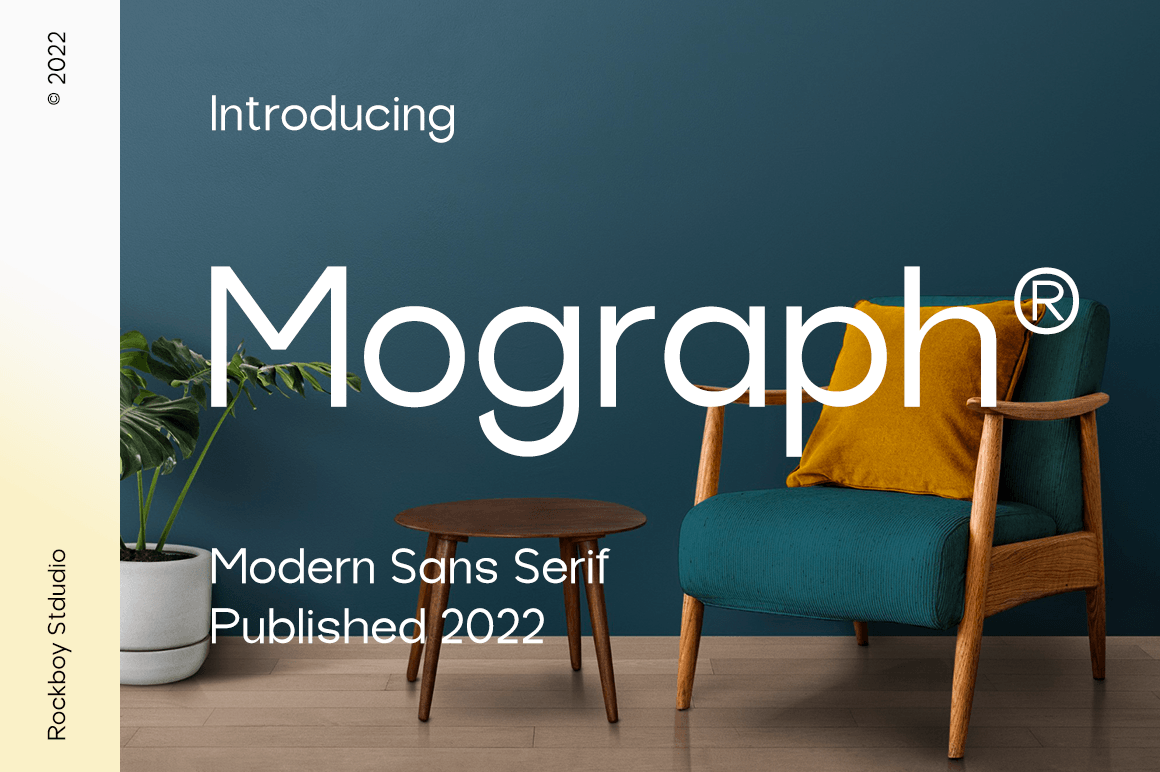
A motion-design-style sans-serif with a dynamic, energetic look. Mograph suits video graphics and YouTube content where you want the text to feel like it’s moving. The bold letterforms are all motion. Great for thumbnails and title cards that need to feel lively.
Best for: Video graphics, YouTube thumbnails. By: RockboyStudio
15. Mango Dream

Soft, rounded, and gentle. Mango Dream has a friendly look made for lifestyle blogs and cute captions. Smooth curves soften every caption it touches. If your content leans into a relaxed, wholesome aesthetic, this is a nice body font to pair with a bolder display face.
Best for: Lifestyle blogs, cute captions. By: Cotton White Studio
16. North Hiking

Adventure-inspired and rugged. North Hiking has that sturdy, outdoor look that suits travel posts and outdoor brand content. Everything about it reads sturdy and dependable. It’s the font you’d use for a hiking brand or a travel vlog thumbnail.
Best for: Travel posts, outdoor brands. By: jinanstd
17. Stines

Clean, classic, and neutral. Stines is the kind of sans-serif that works for everything and stands out for nothing. That’s actually a feature, not a bug. The simple shapes make it easy to read and pair with almost any display font. A solid choice for body text and minimal branding where you want the words to do the talking.
Best for: Body text, minimal branding. By: teguh pranata
18. Malerine

Fashionable and editorial. Malerine has that chic, modern look that fits boutique branding and lookbooks. It reads sophisticated without a hint of stuffiness. If your brand is in the fashion or beauty space and you want your typography to feel high-end, this is a strong pick.
Best for: Boutique branding, lookbooks. By: Yarman (7NTypes)
19. Healing

Graceful and calm. Healing has a serene look that works beautifully for wellness posts, quotes, and printables. It’s soft and soothing, which matches the wellness content it usually sits next to. It’s the kind of font that makes a quote card feel like a little moment of peace.
Best for: Wellness posts, quotes, printables. By: dylla studio
20. Miscala Aesthetic

An aesthetic serif designed with visual appeal in mind. Miscala Aesthetic has that trendy, curated look that’s tailor-made for Pinterest pins and mood boards. Nothing about it feels accidental. If you’re building a Pinterest presence or creating aesthetic content, this font fits right in.
Best for: Pinterest pins, mood boards. By: imoodev
21. Klandestin

Stylish and contemporary. Klandestin has a chic look that works well for social quotes and branding that needs to feel sophisticated but not old-fashioned. Refined details keep it firmly modern. It’s a good middle ground between a traditional serif and something more editorial.
Best for: Social quotes, chic branding. By: Dryy.type
22. Casthelic

Classic and bookish. Casthelic has that traditional, literary look that suits editorial graphics and print materials. On the page it carries real authority. If you’re designing something that needs to feel established and trustworthy, this serif delivers.
Best for: Editorial graphics, print materials. By: Dryy.type
23. Richmond Grovelyn

Traditional and formal. Richmond Grovelyn has a classic, elegant look that works well for invitations and premium print. It has genuine presence on a formal layout. This is the font you reach for when the project needs to feel important and polished.
Best for: Formal invitations, premium print. By: Moontiontype
24. Quanta La Oranj

Retro-flavored with a vintage, nostalgic edge. Quanta La Oranj has odd, characterful curves. It’s a natural fit for vintage branding, and it makes a simple text layout feel like it was pulled from a 70s magazine.
Best for: Vintage branding, retro content. By: Creativeqube Design
25. Yusliana

Feminine and elegant. Yusliana has a soft, graceful look that works well for beauty branding and elegant quotes. Everything about it feels quietly refined. It’s a nice choice for content that needs to feel sophisticated and polished without being cold.
Best for: Beauty branding, elegant quotes. By: gianstudio12
26. Mikaila Signature

A signature-style script that looks like someone actually signed it. Mikaila Signature has a personal, handwritten quality that’s practically built for watermarks and logo signatures. That authenticity is hard to fake with a standard script. Use it for one or two words where you want the text to feel like a personal touch.
Best for: Watermarks, logo signatures. By: ibracreative
27. Ahzari

Flowing calligraphy with an elegant, graceful feel. Ahzari’s smooth strokes have a genuine artistry to them. It works well for quotes and greeting cards where you want the text to feel beautiful and intentional. This is a font you use sparingly, for the words that matter most.
Best for: Quotes, greeting cards. By: RGB Studio
28. Andhilia

Elegant and celebratory. Andhilia has a festive, joyful look that works well for boutique posts and celebration content. The decorative details turn a plain announcement into something that feels like an event.
Best for: Boutique posts, celebration content. By: adifoundry
29. Midwest Story

Relaxed and storytelling. Midwest Story has a casual, friendly look that suits lifestyle blogs and family content. It feels like someone is telling you a story over coffee.
Best for: Lifestyle blogs, family content. By: rhegajuliandy
30. Double Charm

Cheerful and swashy. Double Charm has a playful, fun look that works well for party posts and product promos. The swashy details add bounce to even short lines. It’s a good accent font for designs that need to feel lively and engaging.
Best for: Party posts, product promos. By: FVBFontArt
31. Leffario

Modern calligraphy with a sleek, contemporary edge. Leffario is a natural fit for Instagram quotes and reel covers where you want the text to look polished and trendy. It looks stylish without getting overly decorative. A solid choice for content that needs to feel put-together.
Best for: Instagram quotes, reel covers. By: Joni type
32. South Catalonia

Breezy and handwritten. South Catalonia has a relaxed, casual look that works well for travel captions and lifestyle content. The casual strokes feel unhurried and free-spirited. It’s the font you’d use for a “wander more” caption or a travel diary post.
Best for: Travel captions, lifestyle content. By: RasdiType
33. Outer Space

Bold brush script with real expressive power. Outer Space has thick, inky strokes that land with real force. It works well for statement quotes and music posters where you want the text to hit hard. This is not a subtle font. It’s the one you use when you want to be felt.
Best for: Statement quotes, music posters. By: forthandwildstudio
34. Heart + Soul

Expressive and relatable. Heart + Soul has a warm, emotional look that works well for quote cards and memes. The warmth in the strokes comes across as genuine. It’s the font that makes a relatable quote feel like it was written just for your audience.
Best for: Quote cards, memes. By: sassandsnark.shop
35. Cheesecake

Sweet, rounded, and a little indulgent. Cheesecake has a cute look that works perfectly for bakery branding and cafe content. It has the same cozy energy as the name suggests. If your business is in food or hospitality and you want your typography to feel inviting, this is a great match.
Best for: Bakery branding, cafe content. By: Cotton White Studio
36. Canva

Yes, it’s literally named Canva. A modern handwriting font with a clean, contemporary look. It works well for journal-style captions and casual content where you want the text to feel effortless. A fun little nod to the platform itself.
Best for: Journal-style captions, casual content. By: PAYJHOshop
37. Aesthetic

Minimal and curated. Aesthetic (the font) has a clean look that works well for Pinterest pins and vibe boards. The restraint is the whole point. Even a plain text layout ends up looking carefully composed.
Best for: Pinterest pins, vibe boards. By: Choirulcreator
38. Neat Handwritten

Tidy and organized. Neat Handwritten has a clean look that suits planner-style content and notes. Letters stay tidy even when you write more than a caption. If you’re designing printable planners or study guides, this is a practical handwriting font that stays readable.
Best for: Planner content, notes. By: Ahappycraft
39. Good Vibes

Casual and upbeat. Good Vibes has a positive, feel-good look that works well for positive quotes and stickers. It’s the font you’d use for a “you’ve got this” reminder or a motivational sticker pack.
Best for: Positive quotes, stickers. By: narinari32
40. Simple Writing

Plain, simple, and unadorned. Simple Writing has a clean look that works well for caption overlays and minimal content. No frills, no decoration. Just clean handwriting that gets the job done.
Best for: Caption overlays, minimal content. By: ABBAsalam
41. Groovy Bloom

70s groovy bubble with a floral twist. Groovy Bloom has a retro, nostalgic look that works well for retro social posts and floral promos. The puffy bubble letters are pure 70s, in a good way. If you’re going for that vintage flower market aesthetic, this font is a strong choice.
Best for: Retro social posts, floral promos. By: ajiwaluyo88
42. Groovumbo

Funky retro bubble with a Y2K/70s crossover aesthetic. Groovumbo’s wobbly bubble lettering is deliberately playful. It suits party invites and anything that needs to feel trendy and fun. This is the font that makes a simple “You’re invited” text look like a whole vibe.
Best for: Y2K aesthetics, party invites. By: hatimestea
43. Retro Kayla
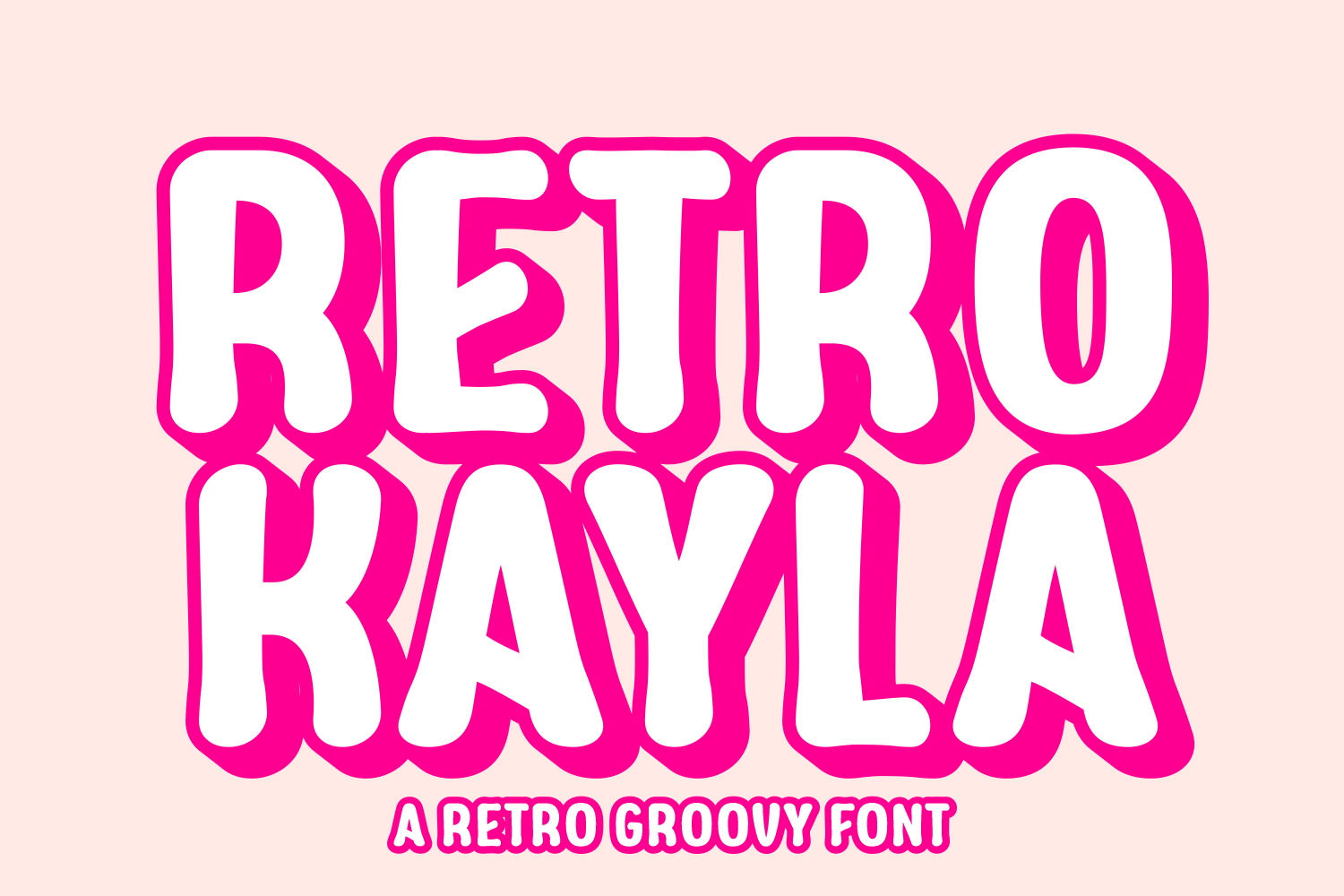
Chunky retro display with a vintage, bold edge. Retro Kayla’s chunky letterforms carry that borrowed-from-the-past charm. It fits vintage branding and thrift-store posts where you want the text to feel classic and cool. There’s a certain confidence to this font that makes it work for bold, statement-making designs.
Best for: Vintage branding, thrift-store posts. By: abg
44. Groovy Melt

Melting groovy letters with a psychedelic, fluid look. Groovy Melt’s letters genuinely look like they’re dripping down the page. Reach for it on posters and fun merch where you want the text to feel artistic and unique.
Best for: Psychedelic posters, fun merch. By: Zetastock
45. Stay Lucky

Playful retro display with a fun, optimistic energy. Stay Lucky’s bold lettering practically grins at you. It works well for motivational posts and retro merch. The name says it all. Use it for content that’s meant to make people smile.
Best for: Motivational posts, retro merch. By: Anto (7NTypes)
Tips for Uploading Fonts to Canva
Here’s the step-by-step process:
- Download the font file. Most fonts come in a zip archive containing .ttf or .otf files. Unzip them on your computer.
- In Canva, go to Brand, then Brand Kit, then Brand fonts.
- Click “Upload a font” and confirm you have the rights to use the file.
- Select the .OTF, .TTF, or .WOFF file and wait for it to process.
- The font will appear in your Brand Kit and in the font dropdown for all your designs.
You can also access the upload option from the Fonts section or at the bottom of the font dropdown in the editor. Same result, different path.
Why won’t my font upload?
A few common reasons:
- Wrong format. Canva only supports OTF, TTF, and WOFF. It does not support web fonts or image files.
- Embedding restrictions. Some fonts have embedding restrictions built into the file. If a font is not licensed for embedding, Canva may block the upload.
- Rights not confirmed. Make sure you’ve confirmed your rights to use the font when prompted.
- Wrong Brand Kit. If you’re on a Teams account, you might have multiple Brand Kits. Check that you’re looking in the right one.
Licensing for commercial work
Fonts built into Canva are licensed for commercial use within designs you export from Canva. That’s it. The license does not extend to using the font file in another program. If you upload your own fonts, you’re responsible for their licensing. For business work like logos, templates for sale, or branded merchandise, use fonts with explicit commercial licenses. Marketplaces like Creative Fabrica typically provide clear licensing terms, which makes them a safer choice for commercial projects.
Where to use each style
Display fonts go on headlines, thumbnails, and banners. Not body text. Sans serifs handle body text, captions, and presentations. Serifs work well for branding, quotes, and print materials. Scripts and signature fonts are for accents: a name, a highlight, a watermark. Handwriting fonts suit casual captions and journal-style content. Groovy and retro styles are for trendy content and event posters.
One practical tip: zoom your design out to thumbnail size and check if the text is still legible. If you can’t read it at that size, it’s too small or the font is too decorative for that context.
Tips for Pairing Fonts in Canva
The basic formula is simple: a bold display or elegant serif for the headline, and a clean sans-serif for the body text. This creates contrast and makes your design easier to read. Stick to two or three fonts per brand. More than that creates visual noise and makes everything look cluttered.
A few rules that help:
- Don’t pair two script fonts in the same design. Use a script for an accent (the first line of a quote, a name) and a sans or serif for the rest.
- Contrast in weight and mood is key. Pair a chunky display font with a thin sans-serif, or an editorial serif with a geometric sans-serif.
- If both fonts are bold, the design feels heavy. If both are light, it feels weak. You want tension between them.
Here are some ready-made pairings from this list:
- Mochi Block with Berry Sans for posts and thumbnails.
- Yusliana with Stines for premium branding.
- Leffario with Valtora for Instagram quotes.
- Groovy Bloom with Mango Dream for retro cards.
- College Black with Nexusbold for sports content.
Saving your font pairs in your Brand Kit helps maintain consistency across all your templates and team members. It keeps your brand look cohesive whether you’re making a carousel, a logo, or a printable.
Try Studio AI on Your Own Design
Fonts set the mood before a single word is read. Creative Fabrica Studio is a browser-based tool with AI features: test fonts on your own text, generate matching graphics, and export polished files.
Try Studio AI Free →Where to Find Fonts for Canva
You have a few options. The built-in Canva library is a good starting point. You can filter by style and see which fonts are free or Pro-only. Google Fonts offers many free options, but always check the license file for commercial use and embedding rights before you use them in a project you plan to sell.
Websites like DaFont and 1001 Fonts have large collections of free fonts, but most are licensed for personal use only. Read the license carefully before using them for business.
Marketplaces like Etsy and Creative Fabrica (browse all Canva-ready fonts on Creative Fabrica) offer a large library of fonts with clear licensing terms. They often include commercial-use licenses, which are essential for business projects. You can browse categories for display, sans-serif, serif, and script fonts. Before uploading a font to your Brand Kit, check three things: the format (OTF, TTF, or WOFF), the license (personal vs. commercial), and embedding rights. If any of those are missing or restricted, Canva may reject the upload.
If you’re exploring other craft and design projects, there are more font guides and tool tutorials on the FontPro blog. You can also find Best Printable Designs and Best Hand Drawn Illustrations SVG that pair well with your Canva layouts.