· fonts · 13 min read
19 Best Watercolor Script Fonts in 2026
The best watercolor script fonts: flowing hand-painted scripts plus real watercolor SVG color fonts. Download for weddings, logos, prints and social media.

Watercolor typography has that soft, hand made quality that makes a design feel alive. But here is the thing that trips people up: the phrase “watercolor font” actually refers to two completely different products. One is a vector script that looks painted. The other is an SVG color font with real pigment texture baked into every glyph. Pick the wrong one and you will have a broken print job, a failed Cricut cut, or a tiny caption that looks like mud.
This list pulls together 19 fonts from both families. I have included practical notes for weddings, logos, cards, and social media so you can match the font to the actual job. All picks come from Creative Fabrica listings, so check each product page for file format, PUA usage, and app support before you commit.
Watercolor Fonts: Vector Script vs SVG Color
Vector script fonts are clean outlines. They scale from a business card to a storefront sign without breaking a sweat. They work in Adobe Illustrator, Canva, Cricut Design Space, Silhouette Studio, and basically any desktop editor you already have open. The watercolor feel comes from the letterforms themselves: dry brush edges, soft swashes, a hand painted rhythm. You pick the color, so the same script can be dusty rose, sage, charcoal, or plain black.
SVG color fonts work differently. The glyph carries its own watercolor texture, often with pigment pooling, paper grain, and a fixed color that you cannot change. They look incredible in large digital layouts. But they need an app that supports OpenType SVG, which means Photoshop, Illustrator, or InDesign CC. They are not built for Cricut cutting, laser engraving, or tiny body text. The texture gets muddy at small sizes, and the file weight can slow your project down.
Here is the quick rule I use: if the project needs print, cutting, resizing, or a logo, start with a vector script. If you want a wow effect in a digital invitation, an Instagram post, or a large mockup, an SVG color font can do the heavy lifting. Vector scripts are flexible tools. SVG color fonts are visual effects with a specific job.
Best Watercolor Script Fonts (Vector)
These hand painted fonts are the workhorses of the list. They are easier to color, easier to cut, and more forgiving at small sizes. I reach for them on wedding invitations, logo marks, packaging, and social templates where I need a soft watercolor mood without losing control over the final output.
1. Watercolor
This is a gentle brush script with a soft, romantic flow. It feels like a watercolor calligraphy font made for invitations, but it stays clean enough for vector work. If you search for Watercolor on Creative Fabrica, check the slug watercolor-134 to find this pinkmeca version.
Best for: wedding invitations, monograms, and greeting cards. By: pinkmeca
2. Watercolor

This version leans into smooth, flowing calligraphy with a light painted edge. It has enough movement for a hero word, but the strokes remain readable for short phrases. The slug watercolor-236 helps you separate it from the other fonts sharing this name.
Best for: wedding titles, brand logos, and large display text. By: william jhordy
3. Watercolor

This one has a more obvious hand painted character. Loose strokes, a relaxed artistic feel, the kind of thing that suits designs that want a watercolor font without looking too polished. Look for slug watercolor-6 if you want the ngefont listing.
Best for: handmade cards, poster titles, and craft branding. By: ngefont
4. Watercolor

This soft script is ideal when you want a delicate watercolor mood for cards and small announcements. The letterforms are light, but they still hold up for names and short messages. The slug watercolor-51 points to the najmustsaqib.creator version.
Best for: greeting cards, baby announcements, and social quotes. By: najmustsaqib.creator
5. Watercolour

The British spelling is a small detail, but it also signals a slightly different character. This script feels refined and romantic, with a clean enough structure for wedding stationery. Use slug watercolour-7 to find the Misterletter.co listing.
Best for: wedding suites, floral logos, and elegant invitations. By: Misterletter.co
6. Watercolor

This delicate script is a good fit for monograms, names, and quiet luxury designs. It has a soft watercolor feel without heavy texture, which helps it stay crisp in vector files. Check slug watercolor-22 for the GiaLetter version.
Best for: monograms, wedding names, and boutique packaging. By: GiaLetter
7. Babies Girl

Babies Girl brings a sweet, rounded script with a gentle watercolor mood. It works well for baby showers, nursery prints, and soft pink or pastel layouts. The name is specific, so it is easier to find than another generic Watercolor listing buried in search results.
Best for: baby shower invites, nursery wall art, and pastel cards. By: Natural Ink
8. Bon Appetit

This brush script has a warm, food friendly personality. It feels hand painted enough for a cafe logo, but simple enough for menus, labels, and social posts. There are a lot of Bon Appetit fonts out there, so check slug bon-appetit-90 for this saridezra design.
Best for: cafe logos, menu headers, and food packaging. By: saridezra
9. Magnolia

Magnolia has a floral, romantic feel that pairs naturally with watercolor wedding designs. The script is expressive, but it does not get overly busy, which is helpful when you are setting names and short phrases. Use slug magnolia-137 to find the Pretty Glyphs version.
Best for: wedding invitations, floral branding, and event posters. By: Pretty Glyphs
10. Woys

Woys is a casual, hand painted script with a friendly, slightly loose energy. It suits posters, small business branding, and designs that need a watercolor feel without formal calligraphy. It is a good choice when the project should feel personal rather than polished.
Best for: posters, casual logos, and handmade product labels. By: SmartDesigns
11. Andai Kata

Andai Kata brings an expressive brush feel with strong movement and a confident watercolor mood. It can carry a logo or a headline when you want the type to feel alive. The strokes are bold enough for display use, but still soft enough for romantic or creative projects.
Best for: logo marks, event titles, and expressive social graphics. By: wep - Wahyu Eka Prasetya
12. Samantha

Samantha is an elegant wedding script with a soft watercolor personality. It feels refined enough for formal invitations, but the brush character keeps it warm. If you are building a watercolor fonts for wedding suite, this is a strong option for names and headline words. Check slug samantha-19.
Best for: wedding invitations, bridal branding, and event stationery. By: madjack.font
Best Watercolor Color Fonts (SVG)
These are the watercolor fonts with real texture inside the glyphs. They are best for large digital displays, mockups, and social graphics where the pigment look is the whole point. Before using one, check that your editor supports OpenType SVG and test the design at the size you plan to publish. I have seen texture that looks gorgeous at 120 point turn to static at 18 point.
13. Super Watercolor
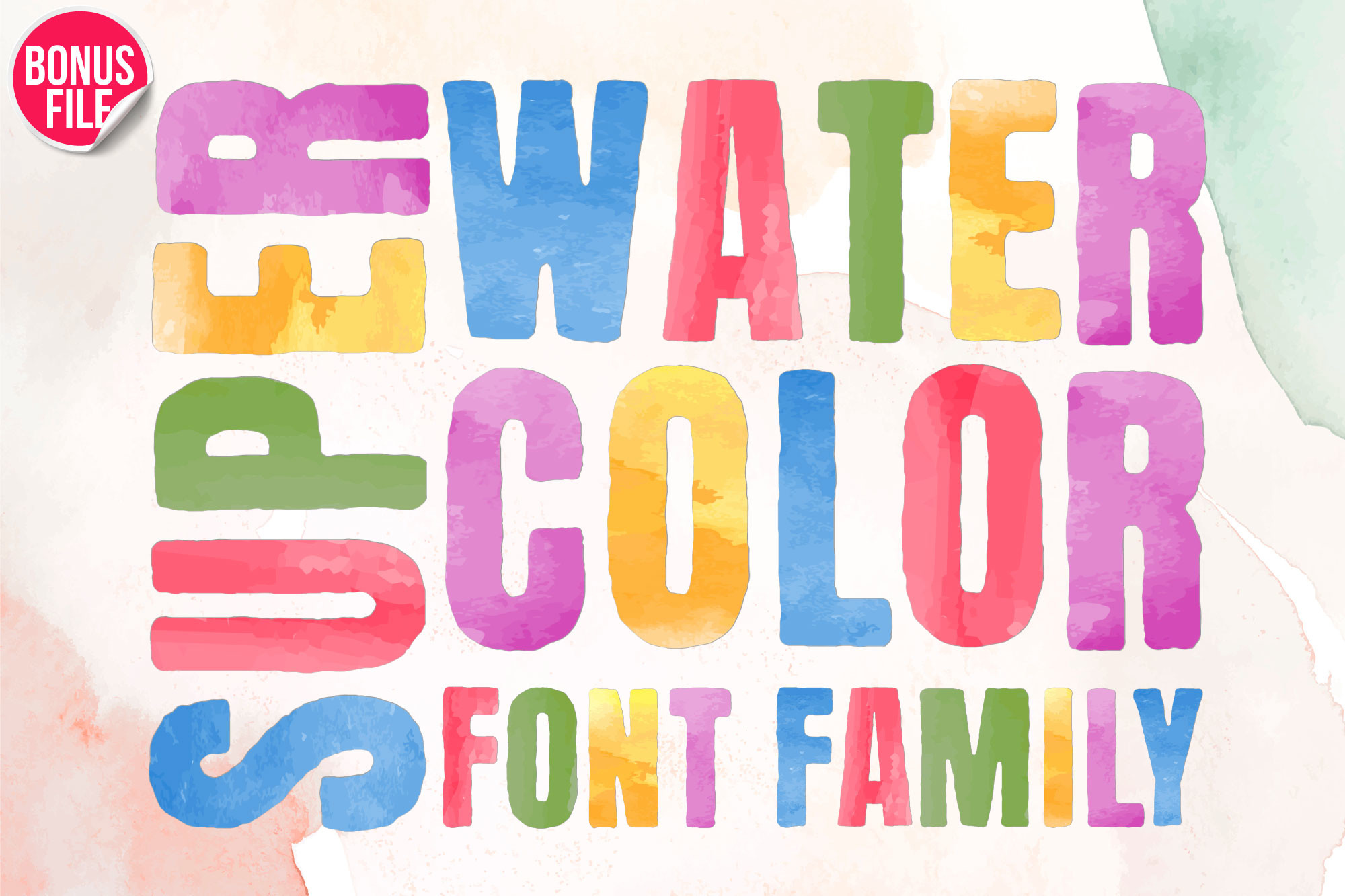
Super Watercolor delivers bright, saturated washes that feel like real paint on paper. It is a strong choice for social covers, digital invitations, and large display words where the texture can shine. Keep the type size large, because fine details can get noisy at small caps.
Best for: social covers, digital invitations, and bold display text. By: Nobu Collections
14. Watercolor

This listing leans into a realistic watercolor look, with soft edges and a natural pigment feel. It works well when you want the type to look painted rather than outlined. The slug watercolor-79 helps you find the tanondesign version among other same name fonts.
Best for: digital art, large quotes, and watercolor style posts. By: tanondesign
15. Watercolor Collection

This collection is useful when you want several watercolor color options in one place. It can save time when you are testing different pigment tones for a brand, a wedding suite, or a series of social posts. Check the product page for the exact styles and file formats included.
Best for: brand testing, wedding suites, and social content series. By: Font Craft Studio
Download Watercolor Collection
16. Watercolor

This soft wash style is a good match for calm, airy designs. The color feels diffused, which can make a digital invitation or quote card look gentle and organic. Use slug watercolor-161 to find the NPNaay listing.
Best for: quote cards, digital invitations, and soft social graphics. By: NPNaay
17. Watercolor

This is a classic watercolor SVG font with a familiar painted look. It suits projects that need a recognizable watercolor effect without a lot of extra ornament. The slug watercolor points to the Ryn Pojas listing, so it is worth checking if you want a more established name in this style.
Best for: digital posters, large headlines, and painted style graphics. By: Ryn Pojas
18. Romsky Watercolor

Romsky Watercolor has an artistic, expressive feel with visible washes and a painterly edge. It is a good pick when the type should feel like part of the artwork, not just a label. Use it for large statements where the texture can breathe.
Best for: art prints, large display words, and creative posters. By: freeject
19. Pickley

Pickley is playful and bright, with a watercolor color feel that suits fun projects. It can work for children’s designs, party invitations, and social posts that need a cheerful, hand made look. Keep the size large enough for the texture to read clearly.
Best for: children’s designs, party invitations, and bright social posts. By: By Lef
How to Choose a Watercolor Font
Start with the job, not the pretty preview. If the font will be cut on a Cricut, engraved on a laser cutter, or placed in a logo that must scale, choose a vector script. It gives you clean paths, easy recoloring, and more control in production files.
A quick checklist:
- Print or cut: choose vector script.
- Large digital display: consider SVG color.
- Logo or brand mark: choose vector script.
- Small body text: avoid heavy SVG texture.
- Recoloring needed: choose vector script.
- Real pigment look: choose SVG color.
If the project is digital and large, an SVG color font can create a more realistic watercolor effect. Check that your app supports OpenType SVG, then test the text at the final size. Texture that looks rich at 120 point can look grainy at 18 point. I cannot stress this enough because it is the most common mistake I see in client work.
Also check whether the font uses PUA characters. Some decorative fonts store special glyphs in the Private Use Area, which can cause issues in certain apps or when converting text to outlines. The product page usually notes this, but a quick test in your editor can save you from a broken file later.
Pairing matters too. A watercolor script works best with a neutral sans or simple serif for supporting text. The script carries the emotion; the secondary font keeps the details readable. For wedding designs, this pairing helps the invitation feel romantic without becoming hard to read.
Tips for Wedding and Event Designs
For printed wedding invitations, a vector watercolor script is usually the safer choice. It can be resized, recolored, and sent to a print vendor without losing sharpness. If you are making digital invitations, an SVG color font can add a painted look that feels more like real watercolor paper.
Always check the license before using a font in client work, wedding orders, or products for sale. Creative Fabrica product pages list the license terms, and the right license matters when you are selling invitations, stationery, or branded goods.
If you are designing for a wedding vendor, keep a simple file structure. Put the vector script on its own layer, keep the neutral font separate, and export a high resolution preview. For SVG color work, also save a flattened version for clients who will not open the original file. This small habit prevents the common problem where a beautiful watercolor font looks different in a PDF, a Canva project, or a print vendor’s software. It keeps your work organized and makes revisions easier for client work.
Seasonality is real. Wedding demand often rises in spring and early fall, so it helps to build templates before the rush. Save a few vector scripts for names, a neutral font for details, and one SVG color font for digital previews or social announcements. That way you can move quickly when a bride asks for a soft, romantic watercolor look.
Try Studio AI on Your Own Design
Want to see a font in a real design before downloading it? Creative Fabrica Studio is a browser-based tool with AI features — test fonts on your own text, generate matching graphics, remove backgrounds, and export finished designs for print or social media.
Try Studio AI Free →Where to Download Watercolor Fonts
Creative Fabrica is the main source for this list because it combines previews, license details, and a large catalog of watercolor fonts, script fonts, and SVG color fonts. You can compare styles quickly, check the product page for format and support, and download the file you need for a specific project. A clear product page also helps you decide faster, especially when you are comparing several similar watercolor scripts for one project today.
When you compare watercolor fonts, look beyond the preview image. Check the character set, the number of styles, and whether the font includes lowercase, uppercase, numerals, and punctuation. For SVG color fonts, also note the file size and whether the texture is built into the glyph or applied as a separate effect. A larger file is not automatically better, but it can affect how quickly your project loads and how smoothly it exports.
If you are looking for free options, Google Fonts and DaFont can be useful for general script fonts, but they are less likely to have true watercolor SVG textures. Always check the license, especially if you plan to use a font in a logo, packaging, or paid design. For more font recommendations and practical typography guides, see the FontPro blog. That extra check takes a minute, but it can prevent a last minute redesign before final delivery.